
The best sports productions are the ones with the small details that viewers never see, but still make their viewing experience so much better.
Fans don’t notice when virtual ads stay perfectly locked to the playing plane. But operators do. Sponsors don’t talk about calibration workflows or how you need to recalibrate when the weather changes. But operators do, because you’re spending extra minutes making sure calibration is on point.
This is the small release that aims to solve these production headaches, because let’s face it, calibration is something you need done quickly and accurately. With Viz Arena 6.1 you can set up and go to air faster. Plus, an ads logger that’s part of the workflow for easier reporting.
Confidently calibrate with the new improvements
Know immediately that your calibration can be trusted
Whether you’re placing virtual ads on a football field, adding sponsor activations around a basketball court, or creating immersive AR graphics, you can now immediately see when calibration quality may require attention before it becomes an on-air problem.
The new confidence indicator (green-amber-red color bar) will give you immediate feedback on calibration quality, so no more guessing.
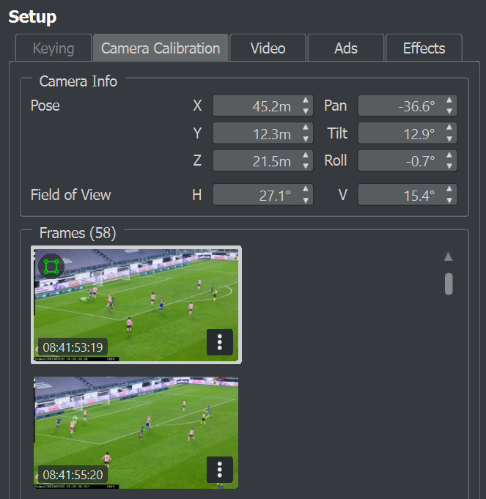
Additionally, the new Camera Info widget gives operators real-time insight into camera position, rotation, focal length, and field of view, making it easier to understand and validate camera setup. This is particularly useful when calibrating custom non-grid sports, where you don’t have reference points, for instance motorsports. The camera widget will better help you position the camera for the first frame, and will continuously refresh during live use.
Fix Calibration Problems Without Starting Over
You can now delete unwanted calibration frames, removing problematic data that could interfere with your production. As well as delete or disable cameras to clean up a calibration setup. So, no need to start over, just delete to remove what you don’t need.
Portable calibration files
Another practical improvement is support for portable calibration files, that you can save and reload from any position.
Overall outcome:
- Easier collaboration between operators
- Greater flexibility when moving productions between projects (for instance between your main and backup projects)
- Faster troubleshooting
- Less time spent recalibrating entire productions
- Reduced risk of graphics drifting or appearing misplaced during a broadcast
AI Keyer Improvements
Ice hockey has presented some of the most difficult keying conditions in sports broadcasting as it is a fast-moving sport played on a highly reflective surface. Not to mention frequent overlapping players, and hockey sticks. Viz Arena AI Keyer has now been trained and validated for ice hockey productions.
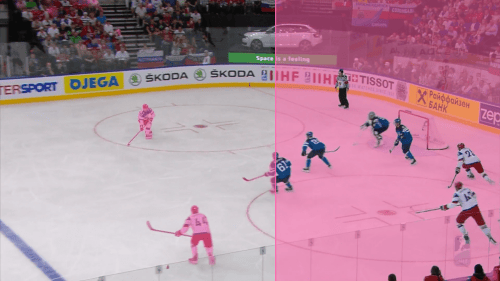
At the same time, the basketball keyer has been given a refresh for cleaner player keying.
Outcome:
- Cleaner graphics integration
- Less operator tweaking
- Higher quality virtual graphics in challenging environments
Ads Logger
Commercial teams also have something to look forward to in this release with the improved ads logger workflow to measure and report virtual ads instances.
Ads Logger is now a plugin installed with Viz Arena, with data stored in a local Ads Logger Database. This makes it easier to create reports for sponsors.
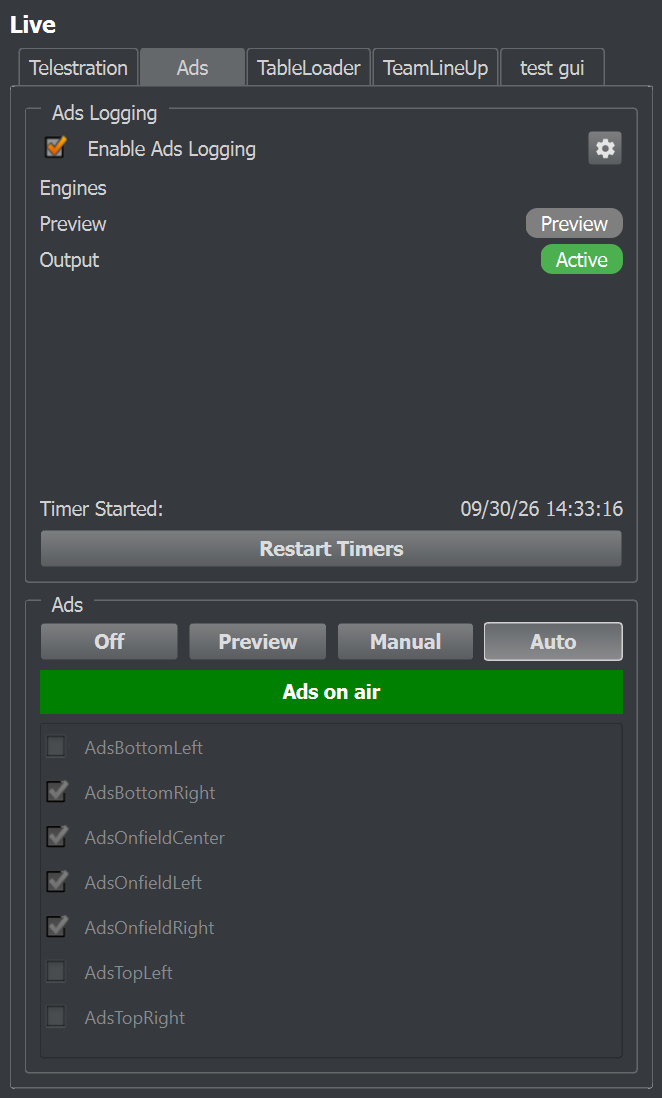
- Improved visibility on advertising instances
- More streamlined reporting process
Other improvements aimed at futureproofing workflows:
- Compatibility with NVIDIA’s latest-generation Blackwell GPUs, paving the way for future graphics, infrastructure, and AI workloads
- Windows 11 support
- Cloud instances: Arena 6.1 is officially supported on AWS cloud versions G5, G6 and G7
Spend less time fixing issues, and more time creating great live sports experiences for fans with Viz Arena 6.1. Download now from the Vizrt FTP portal.