
Template Builder 3.2
Building on the previous release, where Template Builder was completely overhauled and rewritten in modern web technology, more features have been added to Template Builder to sever any dependency to legacy tools.
Now, designers only need to work in Template Builder using TypeScript for scripting. This not only makes template creation faster, it also means a more seamless workflow as the designer no longer has to toggle between Template Builder and legacy Template Wizard. And for engineering teams, there’s no longer a need to maintain two systems.
Built for how you work
The goal when designing this new version was clear: to make your everyday in the newsroom faster, simpler, and less error-prone. All template creation is now done directly in Template Builder, as dependencies on legacy systems, have been removed. And, set smart guardrails and clearer workflow, which in turn means less work and faster turnaround time for you.
Customer complaint: ‘Some journalists just grab the first template they see – not checking that it is the correct template for the show. How do we stop the wrong template from going to air, including WIP templates?’
Pilot Collections
Enter Pilot Collections. A new structured and user-guided way to organize concepts and templates.
Designers can use tags and concepts to group and surface only the templates that are relevant for specific workflows — helping users stay focused, reducing errors, and avoiding confusion.
This is especially helpful when transitioning from legacy systems like Viz Pilot News, where both systems might run in parallel. With Pilot Collections, newsrooms can guide users towards the correct templates without exposing them to development or legacy templates that they shouldn’t be using.
Update Service Script Support
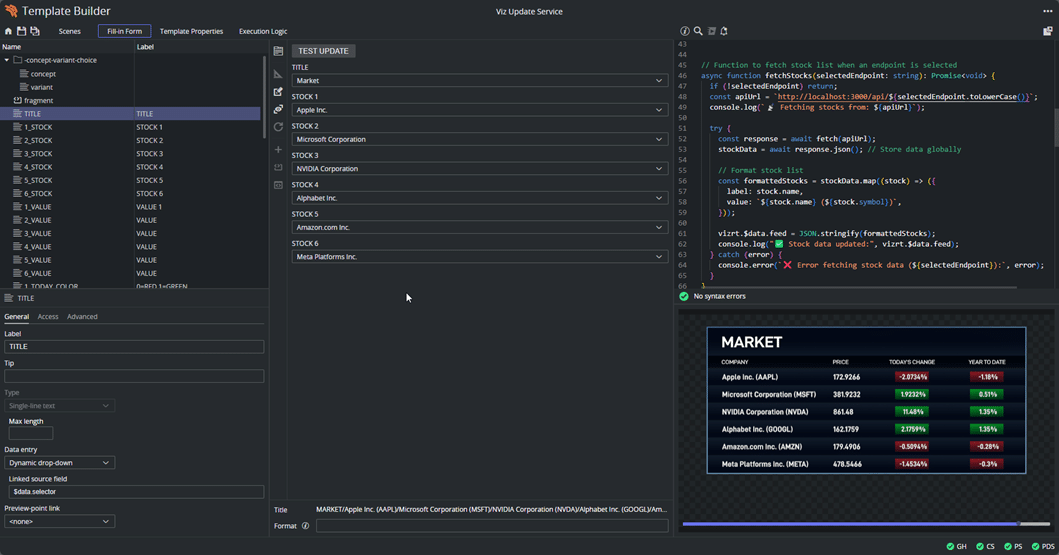
Viz Pilot Edge 3.2 also supports auto-updating data while on air — whether it’s stocks, weather, or other live feeds, your information stays real-time without any manual clicks.
Live data templates can now be written to fetch and auto-update data right before the graphics is taken on air, or even while on air. This is done by using the Vizrt Pilot Update Service (installed with Pilot Data Server) to execute JavaScript templates written in Template Builder or by implementing custom scripts. No need to manually trigger the updates.
Updates happen seamlessly in the background, which will seem familiar to users of Viz Pilot News, as we have replicated the behavior in Viz Pilot Edge. You can, of course, disable auto-update during the design stage or use a separate preview server to review changes before they go live.
Improvements to Custom HTML
There’s also been significant work done around Custom HTML, such as;
- Smart Preview: It is now possible to preview each reveal in advanced graphics, such as videowall explainers, with multiple reveals.
- Save State: When you select a dropdown item from an HTML panel, it will be saved. Subsequently, when you reopen the template, the HTML panel keeps the selection from the dropdown, so you can always stop work and come back to exactly where you had stopped. Promotes collaboration, as work can now be shared without losing momentum.
This release also includes many more quality-of-life improvements to speed up searching for templates, and managing which playout channel a template will automatically be assigned to, without having to manually assign templates to playout channels. For the full list of improvements – please refer to the release notes.
Everything You Need for Viz Pilot Edge 3.2
Access the latest installers for Viz Pilot Edge 3.2 and Template Builder 3.2 on the Vizrt FTP, and find full release notes and documentation in the Vizrt Documentation Center. The updated Template Builder Operation course is also available in Viz University (Community Portal login required). For details on features, requirements, and browser compatibility, visit the Viz Pilot Edge product page.